How do I make a favicon package from a PNG without signing up?
The seven files our icon generator writes from one PNG, what reads each one, where they go on your server and why transparent parts come out solid.
A favicon isn't a file. It's a set of them, because a browser tab, an iOS home screen and an Android install prompt each ask for a different picture at a different size. Drop one PNG into our icon generator and seven files come out the other end. Here's what each one is for, where it has to sit on your server and which ones you can skip.
The whole thing runs inside the page. There's no API route and no server action anywhere in this app, so your logo is read with createImageBitmap, painted into an OffscreenCanvas and encoded to PNG by your own browser. No account and no promise to delete your artwork in an hour.
What are the seven files, and what does each one do?
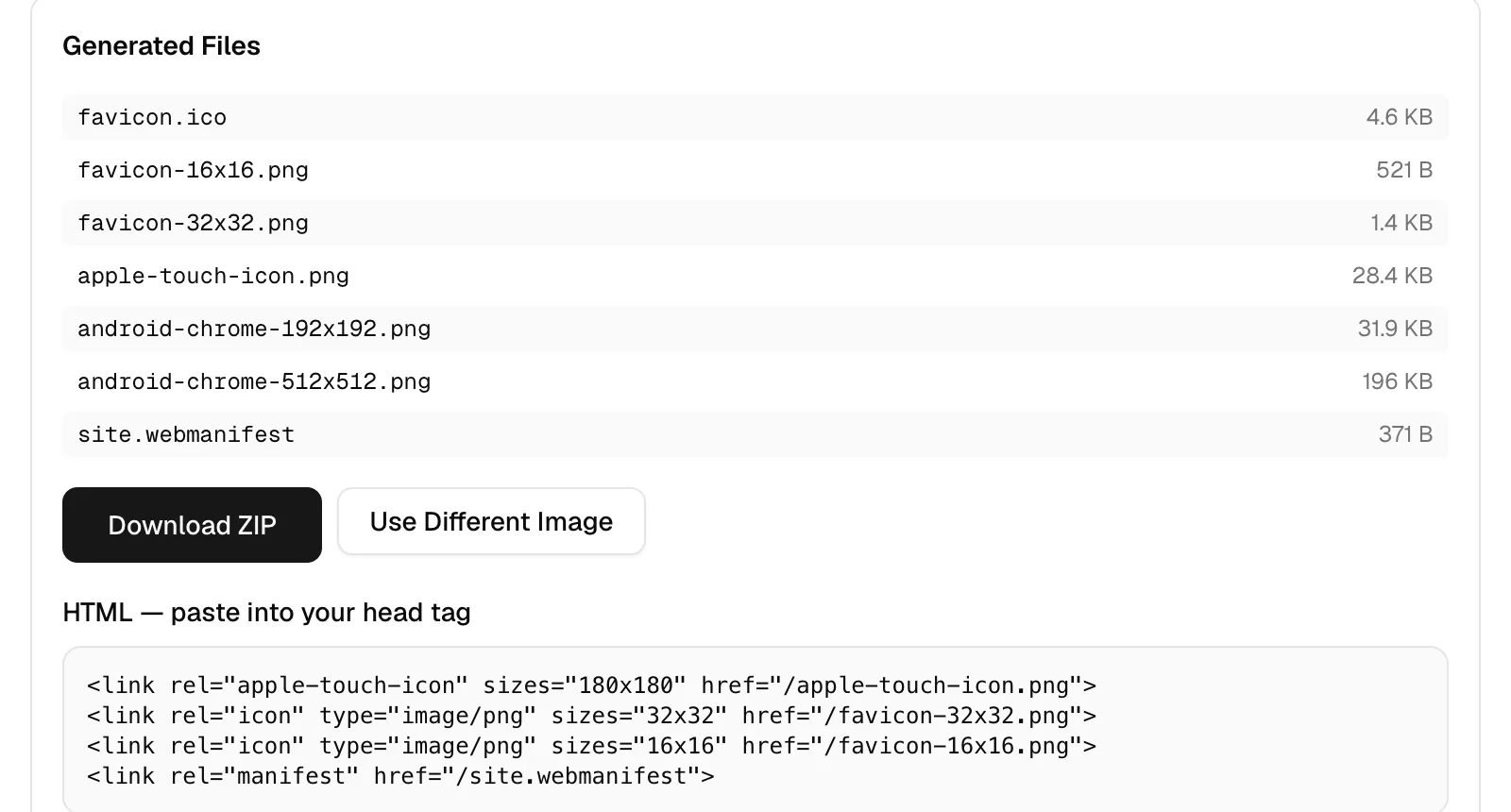
Seven files, one source image. The sizes below come from a real run with alpha.png, a 900 by 606 transparent PNG of 942.4 KB. Your byte counts will differ because they depend on how much detail survives at each size, but the file names and the pixel dimensions are fixed by the tool.
| File | Size from our run | What reads it |
|---|---|---|
| favicon.ico | 4.6 KB | Browsers, fetched from the site root automatically. Packs 16, 32 and 48. |
| favicon-16x16.png | 521 B | The tab strip on standard density screens. |
| favicon-32x32.png | 1.4 KB | Tabs and bookmarks on higher density displays. |
| apple-touch-icon.png | 28.4 KB | Safari on iOS when someone adds your site to the home screen. 180 pixels. |
| android-chrome-192x192.png | 31.9 KB | Listed in site.webmanifest as the 192 icon. |
| android-chrome-512x512.png | 196 KB | Listed in site.webmanifest, used for install prompts and splash screens. |
| site.webmanifest | 371 B | Browsers reading name, short_name, theme_color, background_color and display. |
You don't need all seven. If desktop tabs are all you care about, favicon.ico alone does the job. The Apple file starts mattering the second somebody saves your site to a home screen, and the two Android PNGs only earn their place if you actually ship the manifest.
Where do the files go, and what goes in the head?
All seven belong at the web root, so they resolve as /favicon.ico, /apple-touch-icon.png and so on. On Next.js that's the public folder. Then four tags go in your head: one apple-touch-icon link at 180x180, two rel=icon links for the 32 and the 16, and one link to the manifest. The tool prints that snippet next to the results with a copy button.
site.webmanifest is 371 bytes of JSON holding name, short_name, the two Android icons, theme_color, background_color and display set to standalone. The icon paths inside are written absolute, as /android-chrome-192x192.png, so parking the package in /assets/icons/ quietly breaks them and you'll need to edit both src values. One more trap: leave both name boxes empty in the panel and the manifest ships with the literal name "My App", which is what a phone will print under your icon.
Why isn't favicon.ico in that snippet?
Because browsers ask for it without being told. No tag needed. The HTML spec's rel=icon section describes the /favicon.ico convention: when a document declares no icon link, the browser tries that root path by itself. That's why the .ico works with zero markup, and it's also why the file has to live at the root. A copy sitting in /images/ never gets requested. If you genuinely need it elsewhere, add an explicit icon link pointing at your path and the guessing stops.
What's actually inside favicon.ico?
An .ico is a container. Ours holds three PNGs, rendered at 16, 32 and 48 pixels, behind a 6-byte header plus one 16-byte directory entry per image, which is 54 bytes of structure wrapped around the picture data. That's how a single 4.6 KB file covers three sizes: the browser reads the directory, then pulls the entry that matches what it's drawing. The byte layout of that directory, and why nothing bigger than 256 fits in it, is a piece of its own. Windows has understood PNG payloads inside .ico since Vista and current browsers handle them without complaint.
Why did my transparent PNG come out with a solid background?
Because every icon canvas gets filled before your logo lands on it. The background control is an input type=color, which carries no alpha channel, so the fill is always opaque and the default is #ffffff. Whatever transparency your source had is flattened against that color. There's no transparent option here. Pick the color that matches the surface the mark will sit on before you press generate.
Shape matters too. alpha.png is 900 by 606 and icons are square, so the artwork is fitted inside the square with its long axis at full width, and the background color fills the bands above and below it. If those bands annoy you, square the image first in the cropper, which takes one file up to 10 MB and offers a 1:1 preset among its eight aspect ratios. The margin slider in the icon panel runs from 0 to 30% and insets the artwork evenly on all four sides.
Is 196 KB too big for an icon file?
196 KB for android-chrome-512x512.png looks alarming beside a 521-byte 16px file. Two things take the pressure off. That icon isn't fetched on an ordinary page view, since the tab only ever wants the small one, and PNG straight out of a canvas encoder isn't optimized: convertToBlob writes a valid file with none of the filter and palette work a dedicated optimizer does. It's the same browser encoder that shapes the file sizes in our JPG to PDF measurements.
You can shrink it by running the PNG back through the compressor. On that same 942.4 KB alpha.png, the lossless mode (oxipng level 3) landed at 383.9 KB, down 59% without a pixel changing. The smaller-file mode (imagequant) reached 98.3 KB, down 90%, by reducing the image to a palette. A flat logo with a handful of colors is exactly where a palette costs you nothing you can see. Keep it lossless if your icon is photographic.
Do I need to sign up, and does my logo get uploaded?
No sign-up and nothing to upload. There are no API routes and no server actions in this codebase, and the only requests the page makes are same-origin fetches for its own assets. Open your network panel while you generate and watch it stay quiet. Our privacy page puts it in fewer words than this paragraph does.
The limits are one file at a time and 10 MB, and the dropzone accepts PNG, JPEG, WebP, AVIF, GIF and SVG. An SVG gets rasterized first at the larger of its own dimensions or 512 pixels, so even a 64px source still yields a clean 512 icon. That render loads the file into an <img> element, the same restricted path that drops external fonts and linked bitmaps from an SVG. Everything comes down as one favicon-package.zip containing all seven files. If your logo arrived as an oversized export, resize it first so you're not feeding a 20 megapixel banner into a 16 pixel square.
Do this next: open the icon generator, drop your logo, set the background color to match where the icon will sit, generate, unzip into your web root, paste the four tags into your head and add "start_url": "/" to site.webmanifest. Then hard reload the site and look at the tab. If the 16px version reads as a smudge, go back and simplify the mark before you change anything else. Apple's Configuring Web Applications notes are worth a read if the iOS home screen is your priority.