Favicon Generator
Create a professional website icon with our best favicon generator. This easy tool helps you design a favicon that gives your website a polished appearance. Use our favicon generator free to create a suitable icon from an image and prepare it for your website.
Want to thank us? Tell your friends about LeanImg!
How to Generate Favicons
Upload your image
Choose a logo or image, or drag and drop it into the generator. Supports PNG, JPG, WebP, AVIF, GIF, and SVG.
Customize your icons
Set a background color, adjust margins, and fill in your app name for the web manifest. Preview how your icons look on each platform.
Download your favicon package
Click Generate and download a ZIP with favicon.ico, PNG icons, Apple Touch icon, Android Chrome icons, and site.webmanifest.
What you actually get
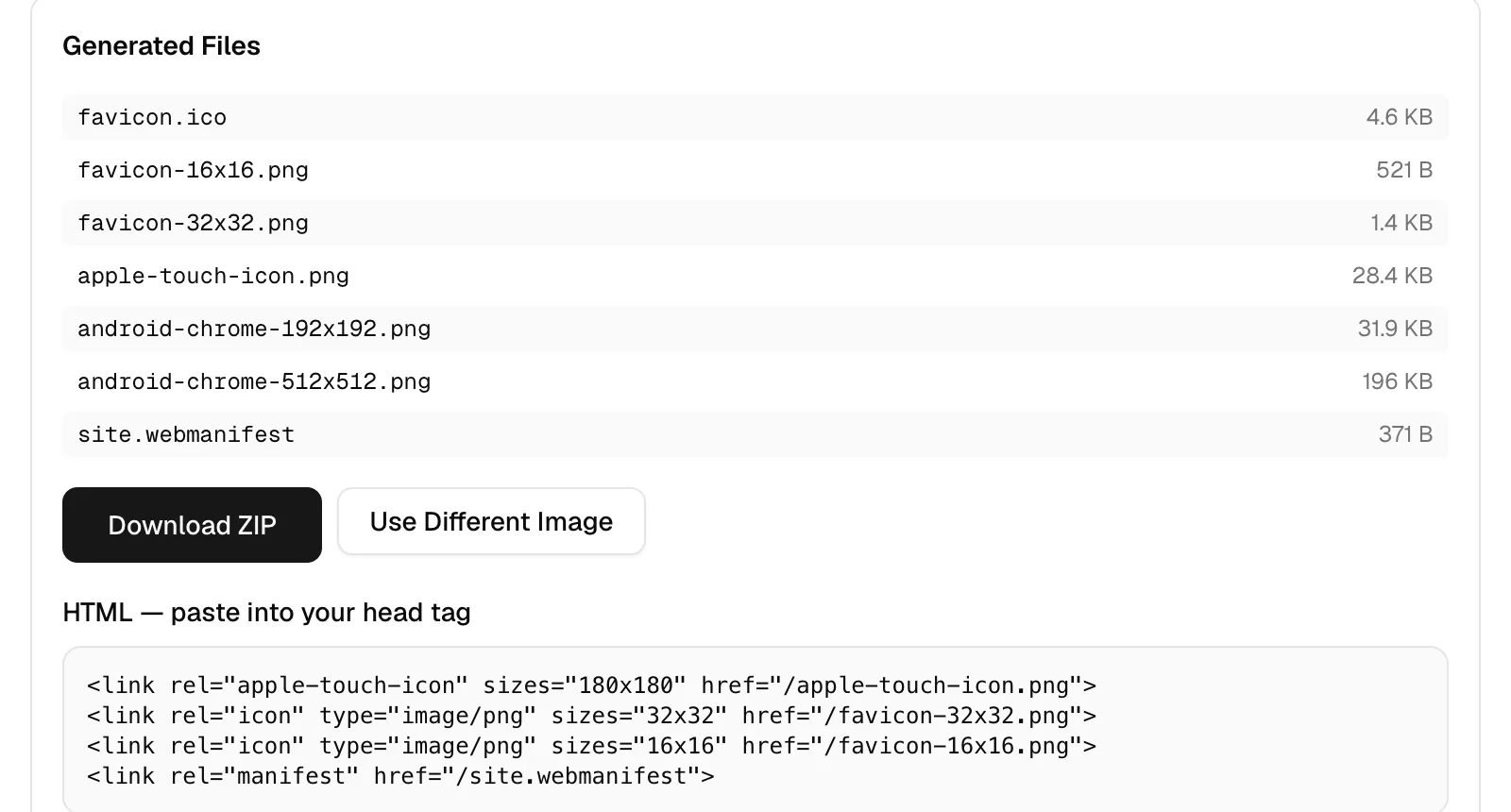
One image in, seven files out, generated in your browser and delivered as a ZIP. These are the real sizes from a 942 KB transparent PNG at 900x606, which is the fixture in the screenshot below.
| File | Pixels | What uses it | Size |
|---|---|---|---|
| favicon.ico | 16, 32 and 48 in one file | Browsers probing /favicon.ico, crawlers, feed readers | 4.6 KB |
| favicon-16x16.png | 16x16 | Browser tab at standard density | 521 B |
| favicon-32x32.png | 32x32 | Tab on a high-density screen, bookmarks, taskbar | 1.4 KB |
| apple-touch-icon.png | 180x180 | iOS and iPadOS home screen | 28.4 KB |
| android-chrome-192x192.png | 192x192 | Android home screen | 31.9 KB |
| android-chrome-512x512.png | 512x512 | Android splash screen and install prompt | 196 KB |
| site.webmanifest | n/a | Names the app and points at the two Android icons | 371 B |
Why there's still an ICO in 2026
Because one path gets requested whether you reference it or not. Anything that never parses your HTML will ask for /favicon.ico directly, and that includes crawlers, RSS readers and a lot of chat link previews. ICO is also the one format here that holds several sizes in a single file, so a 16 pixel version tuned to stay legible can sit beside a 48 pixel one and the client picks. Ours packs 16, 32 and 48.
Designing something that survives 16 pixels
A logo that reads beautifully on a website usually turns to mush in a tab. At 16 pixels you have 256 pixels in total to work with, so fine strokes disappear, gradients band, and any text below about four characters becomes a smudge. Crop to the strongest single element of your mark rather than shrinking the whole lockup, keep contrast high against both light and dark tab bars, and add padding only if the artwork touches the edges. Check the live preview above before you download.
Why LeanImg?
LeanImg generates your complete favicon package instantly, right in your browser. There is nothing to install, no account to create, and no files leave your device — every icon is generated locally using your browser's built-in Canvas API. Upload any image format including SVG, PNG, JPG, or WebP. Set a background color and adjust margins to make your icons look perfect on every platform. Preview how your favicon appears in browser tabs, Google search results, and on iOS and Android home screens before downloading. Your ZIP includes everything you need: favicon.ico with multiple resolutions, PNG favicons, Apple Touch icon, Android Chrome icons, and a ready-to-use site.webmanifest file. No watermarks. No sign-up. No hidden limits. Just fast, free favicon generation that works on any device with a browser.
Instant Processing
Generate all favicon sizes in milliseconds. No upload wait, no server processing — everything runs in your browser.
Complete Package
Get favicon.ico, PNG favicons, Apple Touch icon, Android Chrome icons, and site.webmanifest in a single ZIP download.
Live Preview
See how your favicon looks in browser tabs, Google search results, and on iOS and Android home screens before downloading.
Frequently Asked Questions
What is the best favicon generator for a website?
The best favicon generator makes it easy to create a recognizable website icon from an image or custom design.
Can I use a favicon generator free?
Yes, a favicon generator free tool can help create website icons without requiring advanced design software.
How does LeanImg generate favicons?
LeanImg generates favicons directly in your browser using the Canvas API. Upload a single image, adjust settings like background color and margins, and click Generate. Your image is resized to all standard favicon sizes and packaged into a ZIP file — nothing is uploaded to any server.
What file formats does LeanImg support?
LeanImg accepts PNG, JPG, WebP, AVIF, GIF, and SVG images as input. It generates a favicon.ico file with multiple resolutions, PNG favicons at 16x16 and 32x32, an Apple Touch icon at 180x180, and Android Chrome icons at 192x192 and 512x512 pixels.
Can I generate favicons for multiple images at once?
LeanImg generates a complete favicon package from one source image at a time. Each generation produces all required sizes and formats in a single ZIP download. Upload a new image to create another package — there is no limit on how many you generate.
What is the correct favicon size?
Modern websites need favicons in multiple sizes. The essential set includes 16x16 and 32x32 pixels for browser tabs, 180x180 for Apple Touch icons, and 192x192 plus 512x512 for Android Chrome. LeanImg generates all these sizes automatically from your single source image.
Is it safe to create favicons online?
LeanImg processes your image entirely in your browser. Your files never leave your device — nothing is uploaded to any server and no data is stored. This makes it safe for generating favicons from company logos, brand assets, or any image you prefer to keep private.
Do I need to sign up to generate a favicon?
No. There's no account, no email box and no upload step. The generator runs in your browser using the Canvas API, so your logo is never sent anywhere, and you can close the tab the moment your ZIP has downloaded. Nothing is watermarked and there's no daily cap.
What favicon sizes do I actually need in 2026?
Four, and this tool writes all of them. 16x16 and 32x32 for browser tabs and bookmarks, 180x180 for the iOS home screen, and 192x192 plus 512x512 for Android and the web manifest. The 512 is the one people forget: Android uses it for the splash screen, and without it your app icon falls back to a blurry upscale of a smaller file.
Can I make a favicon from a PNG?
Yes, and a PNG with a transparent background is the ideal input. Transparency is carried through to every PNG in the package, and to the ICO. If your source has no transparency you can set a background color in the panel, plus padding if the artwork runs to the edge, which it usually should not for something displayed at 16 pixels.
ICO or PNG: which favicon format should I use?
Both, which is why the ZIP has both. Modern browsers read the PNG files referenced from your link tags, and those give you crisper small icons. The favicon.ico at your site root is the compatibility floor for anything that never parses your HTML, including feed readers, crawlers and link unfurlers that just probe /favicon.ico. Ours packs 16, 32 and 48 pixel versions into that one file.
What files are in the download?
Seven. favicon.ico, favicon-16x16.png, favicon-32x32.png, apple-touch-icon.png, android-chrome-192x192.png, android-chrome-512x512.png and site.webmanifest, delivered as one ZIP. A real run of a 942 KB source produced 4.6 KB, 521 B, 1.4 KB, 28.4 KB, 31.9 KB, 196 KB and 371 B respectively. The page also prints the four link tags to paste into your head.
Where do I put the files on my site?
At the root, then paste the four link tags. favicon.ico belongs at yoursite.com/favicon.ico because that path gets probed whether you reference it or not. The rest can live anywhere as long as the href matches, though the root keeps the snippet we generate correct as it stands. Browsers cache favicons hard, so use a private window to check your work.
Can I generate favicons for several images at once?
No, one image per run. A favicon package is a set of derivatives of a single mark, so batching would mostly produce collisions on identical filenames. The input cap is 10 MB, which is far more than any logo needs. If you have several brands to do, run them one after another and rename each ZIP as it lands.
Want smaller files? Compress your images before creating icons. Need custom dimensions? Resize your images. Need a different format? Convert your images. Need a cutout? Remove backgrounds with AI.