Do I still need a favicon.ico, or is PNG enough?
ICO is a directory format that packs 16, 32 and 48 into one 4.6 KB file. What's inside it, why PNG doesn't replace it and the seven files to ship.
Every couple of years someone declares favicon.ico dead. Then a feed reader or an old Windows shortcut asks for /favicon.ico, gets a 404 and shows a blank page glyph. Shipping the ICO costs 4.6 KB. That's the whole argument, and it's why our icon generator still writes one.
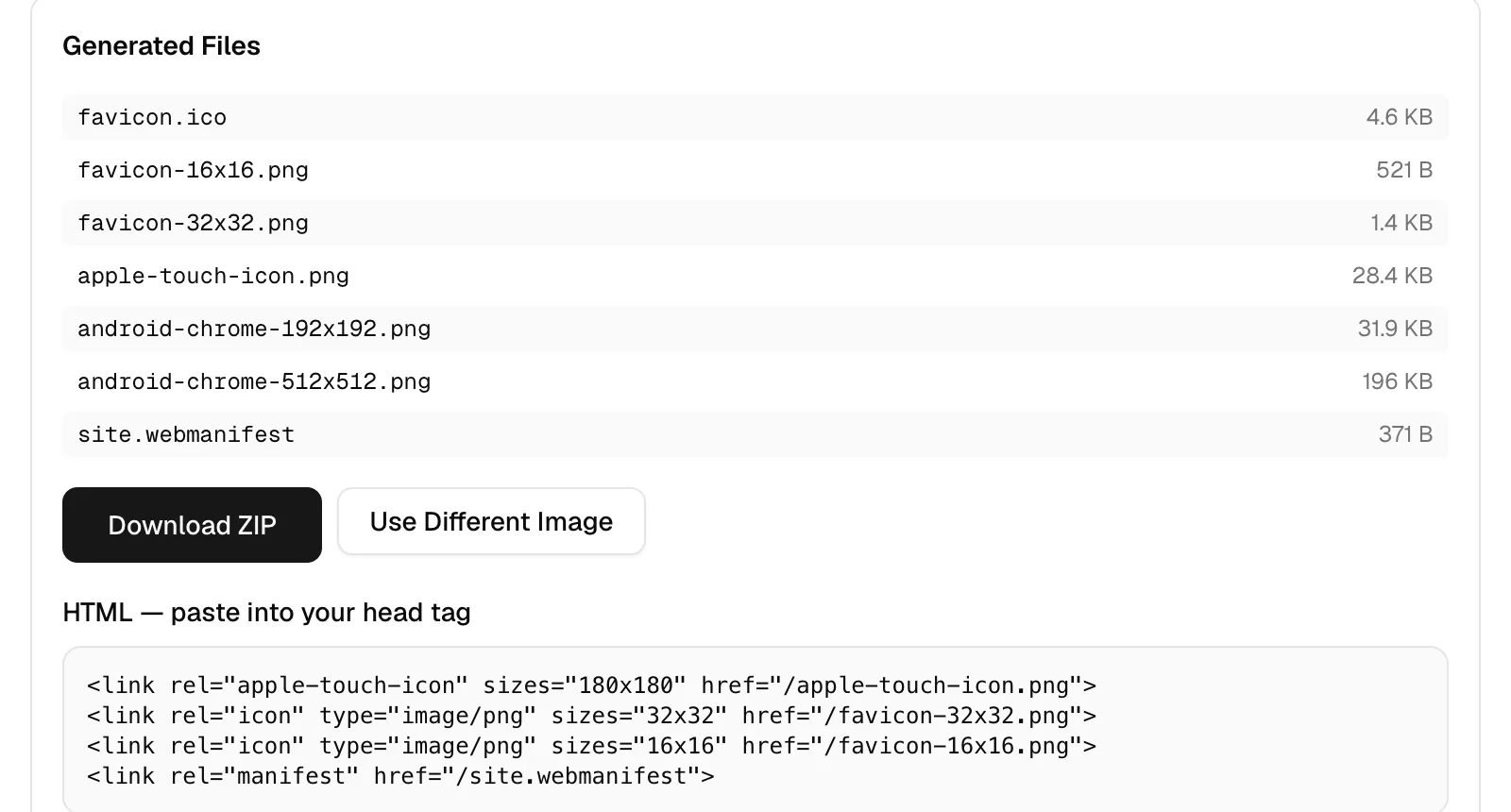
Feed it alpha.png, a 900x606 image with transparency, and seven files come out: favicon.ico at 4.6 KB, favicon-16x16.png at 521 B, favicon-32x32.png at 1.4 KB, apple-touch-icon.png at 28.4 KB and two android-chrome PNGs at 31.9 KB and 196 KB, plus a 371 B site.webmanifest. Your own browser writes all seven. We built it that way because this app has no API routes at all, which is the sentence every server-side favicon site can't say about itself.
What's actually inside a .ico file?
ICO is a directory format. The file opens with six bytes: a reserved word set to 0, a type word set to 1 for icons and a count of how many images follow. After that comes one 16-byte entry per image, carrying width, height, color count, a reserved byte, color planes, bits per pixel, the byte length of the image data and its offset from the start of the file. Then the payloads, concatenated. Microsoft's archived Icons article from 1995 documents those two structures as ICONDIR and ICONDIRENTRY, and they haven't changed.
Width and height each get a single byte, which is why 256x256 has to be stored as 0 and why nothing bigger than 256 fits in the directory at all. Our encoder writes 1 color plane and 32 bits per pixel for each entry, and each payload is a plain PNG. The 1995 spec describes a DIB followed by a 1-bit AND mask for transparency, which is why ancient icons had those hard jagged edges. Three images means 6 bytes of header plus 48 bytes of directory. That's 54 bytes of bookkeeping, and everything else in the 4.6 KB is PNG data.
Why does one favicon.ico hold 16, 32 and 48?
Those are the three sizes ours packs, and they aren't arbitrary. The same Microsoft document tells developers to include 16x16, 32x32 and 48x48 in every icon resource, then spells out the selection rule: the image closest in size to the requested size wins. The tab strip asks for 16. On a 2x display that same 16 CSS pixel slot wants 32 real pixels, and a Windows desktop shortcut asks for 48. If your ICO held only the 16, a shortcut would get a 16 px image stretched to 48, and it'd look exactly like that.
If browsers read PNG, why ship the ICO at all?
Because the two get discovered in different ways. The four-line snippet our tool hands you names PNG files with explicit type and sizes hints, and any client that parses `<head>` will take those. MDN's `<link>` reference shows the same shape, several icon links whose attributes let the browser choose. The HTML Standard also lets a user agent go looking for /favicon.ico by path when no icon link is declared, and plenty of things that fetch your URL never read your markup. SVG favicons are tempting here, and caniuse puts them at 90.49% global support with Safari only picking them up in version 26.0. That leaves a real tail.
What are the seven files and what do they weigh?
| File | Pixels | Size | What reads it |
|---|---|---|---|
| favicon.ico | 16, 32 and 48 packed | 4.6 KB | the /favicon.ico path fallback, Windows shortcuts |
| favicon-16x16.png | 16x16 | 521 B | tab strip at 1x, via a link tag |
| favicon-32x32.png | 32x32 | 1.4 KB | tab strip at 2x, via a link tag |
| apple-touch-icon.png | 180x180 | 28.4 KB | iOS home screen, via a link tag |
| android-chrome-192x192.png | 192x192 | 31.9 KB | the manifest icons array |
| android-chrome-512x512.png | 512x512 | 196 KB | the manifest icons array |
| site.webmanifest | n/a | 371 B | the install prompt |
The 512 dominates. Add the ICO, both small PNGs, the apple-touch-icon and the 192 together and you're under 67 KB combined, against 196 KB for that one file. It's worth knowing which of those actually costs you anything on a page view, because only the ICO and the two small PNGs are in play there.
Why is my transparent logo sitting on a white square?
Because the generator paints the canvas before it draws your artwork, and the default fill is #ffffff. That control is a color input, so there's always some color underneath. Set it to your brand hex and the whole set matches your site. alpha.png went in with an alpha channel and every one of the seven images came out opaque, which surprises people who expect a transparent favicon.
The margin slider runs 0 to 30 percent and insets your artwork by that share of each icon's edge, so at 10 percent a 32 px icon keeps a 3 px border on every side. That's a visible amount at that scale. Non-square sources get letterboxed: a 900x606 logo keeps its aspect ratio and picks up background bars above and below. Square it first if that bothers you. The cropper has a 1:1 preset, takes one file at a time up to 10 MB and re-encodes lossy formats at a hardcoded quality 92. If you'd rather resize than crop, the resizer has percentage presets at 25, 50 and 75 with cover, contain and stretch fit modes.
How do I convert an ICO back into a PNG?
Use ICO to PNG. It parses the container, walks the directory entries and keeps the one with the largest width, then writes that as a PNG. Point it at the 4.6 KB file above and you'll get a 48x48 image, because 48 is the biggest thing packed in there. It can't recover detail that was never in the file. If you need something larger, the upscaler runs Real-ESRGAN in your browser and always outputs PNG; our small.png test at 400x269 came back as 800x538 on the 2x setting. Whether reconstruction or plain interpolation is the right tool depends on what the icon is for. Worth knowing: the model only produces 4x internally, so 2x is a downscale applied afterwards. Our converter covers 24 pairs across 11 formats and writes ICO for none of them. Icons come from the icon generator.
Is a 196 KB icon too big?
That's android-chrome-512x512.png, and it's the heaviest thing in the set by a distance. It gets fetched when someone installs your site as an app, which is what the W3C Web App Manifest spec governs, so it isn't sitting on the critical path of an ordinary page load. You can still shrink it. Our compressor offers two PNG modes that behave nothing alike: "PNG no compression" runs oxipng at level 3 and stays lossless, while "PNG smaller file size" quantizes to a 256-color palette with imagequant. On alpha.png, 942.4 KB at the source, the lossless pass gave 383.9 KB and the palette pass gave 98.3 KB. A flat logo usually survives 256 colors without anyone noticing. Compression also strips every scrap of metadata, EXIF and ICC included, which for an icon is exactly what you want.
Here's the concrete next step. Open the icon generator, drop in the largest square source you have (it accepts JPEG, PNG, WebP, AVIF, GIF and SVG up to 10 MB, one file), set the background color to your brand hex, leave the margin at 0 and generate. Copy the four link tags into `<head>`, upload favicon.ico to your web root and you're finished. If you want to confirm nothing left your machine, watch the network tab while it runs, or read our privacy page. Where each of the seven files belongs on your server is written up in full separately.