How do I convert an SVG to PNG without losing the fonts?
Why SVG to PNG output lands at 2x the declared size, and why the browser sandbox silently drops external fonts and linked images during the render.
An SVG has no pixels in it. It's XML: paths, fills, a viewBox and maybe a <text> element naming a font the file doesn't actually contain. Rasterizing it to PNG means choosing a pixel grid and painting those shapes onto it, so two things decide whether you like the result. How many pixels you asked for, and what the renderer was allowed to load while it painted.
We run that render inside your browser. The file goes into a blob URL, an <img> element loads it, the browser paints it onto an OffscreenCanvas and a WebAssembly encoder writes the PNG. This app has no API routes and no server actions, so an unreleased logo never sits in someone's temp bucket waiting on a deletion cron. Most SVG to PNG converters upload first and promise cleanup later. Ours never sends the bytes anywhere, which is the whole point of our privacy model.
What actually happens when a browser rasterizes an SVG?
Your SVG gets handed to an <img> element, and that detail drives everything else on this page. An SVG loaded as an image runs in a restricted processing mode where scripts don't execute and external references aren't fetched, which the SVG 2 conformance rules define as the secure processing modes. Once the load resolves we paint it with drawImage onto an OffscreenCanvas, read the pixels back, encode with @jsquash/png and then run oxipng at level 3 over the bytes. That step is lossless. Alpha survives the whole trip, so a transparent logo comes out transparent.
What size will the PNG actually be?
Our converter renders at twice the SVG's intrinsic size. A 500x500 SVG comes out 1000x1000. The doubling buys you a retina-grade file for free, and it's also the thing people trip over when a spec demands an exact pixel count. If the browser reports no usable intrinsic size at all, we substitute 1024x1024 before doubling, so the PNG lands at 2048x2048. The CSS Images spec covers why a size can go missing in the first place: a replaced element with no intrinsic width or height falls back to a default object size, and a viewBox on its own supplies a ratio with no size attached. So set width and height on the root <svg> to half your target. 256 in, 512 out.
| What the root <svg> declares | PNG we write |
|---|---|
| width="500" height="500" | 1000 x 1000 |
| width="256" height="256" | 512 x 512 |
| width="64" height="64" (an icon) | 128 x 128, usually too small |
| No usable intrinsic size | 2048 x 2048 (1024 fallback, doubled) |
Why did my text come out in the wrong font?
This is the most common complaint and it isn't a bug in the converter. A @font-face rule pointing at a .woff2 URL counts as an external reference, so the secure mode blocks that fetch before it starts. Fonts loaded by the page around the image don't reach inside either, because an SVG in an <img> is a separate document doing its own font resolution. What you get is whatever the machine can match from the font-family list, which on a reviewer's laptop means a fallback you never chose. The fix is to stop shipping text as text. Illustrator calls it Type > Create Outlines. Inkscape calls it Path > Object to Path. Both convert every glyph to a path, the file grows a little and the render stops depending on the machine.
Why is the photo inside my SVG missing?
Same rule, different symptom. If your SVG pulls in a bitmap through an <image> element with an absolute https URL, that URL isn't fetched, and the PNG comes back with a hole where the photo should be. A data: URI works fine, because there's no network request left to block. There's a second reason to embed: a cross-origin bitmap painted into a canvas taints it, and reading the pixels back then throws a SecurityError. That failure at least announces itself. A blocked reference is silent, which is what costs people an afternoon. Open the file in a text editor and search for http before you convert.
Can I convert a PNG back into an SVG?
No, and we don't pretend otherwise. Our converter decodes SVG and it can't encode it: the encoders in the build write JPEG, PNG, WebP, AVIF and PDF, and none of the 24 pairs across 11 formats has SVG as a target. Going from pixels back to paths is tracing, a machine guessing where the edges belong, and a traced wordmark is rarely close enough to ship. Re-export from the original if you still have it. If what you really need is the raster at a larger size, our upscaler runs Real-ESRGAN and always writes PNG: it took a 400x269 file to 1600x1076 at 4x.
How do I turn an SVG into a favicon set?
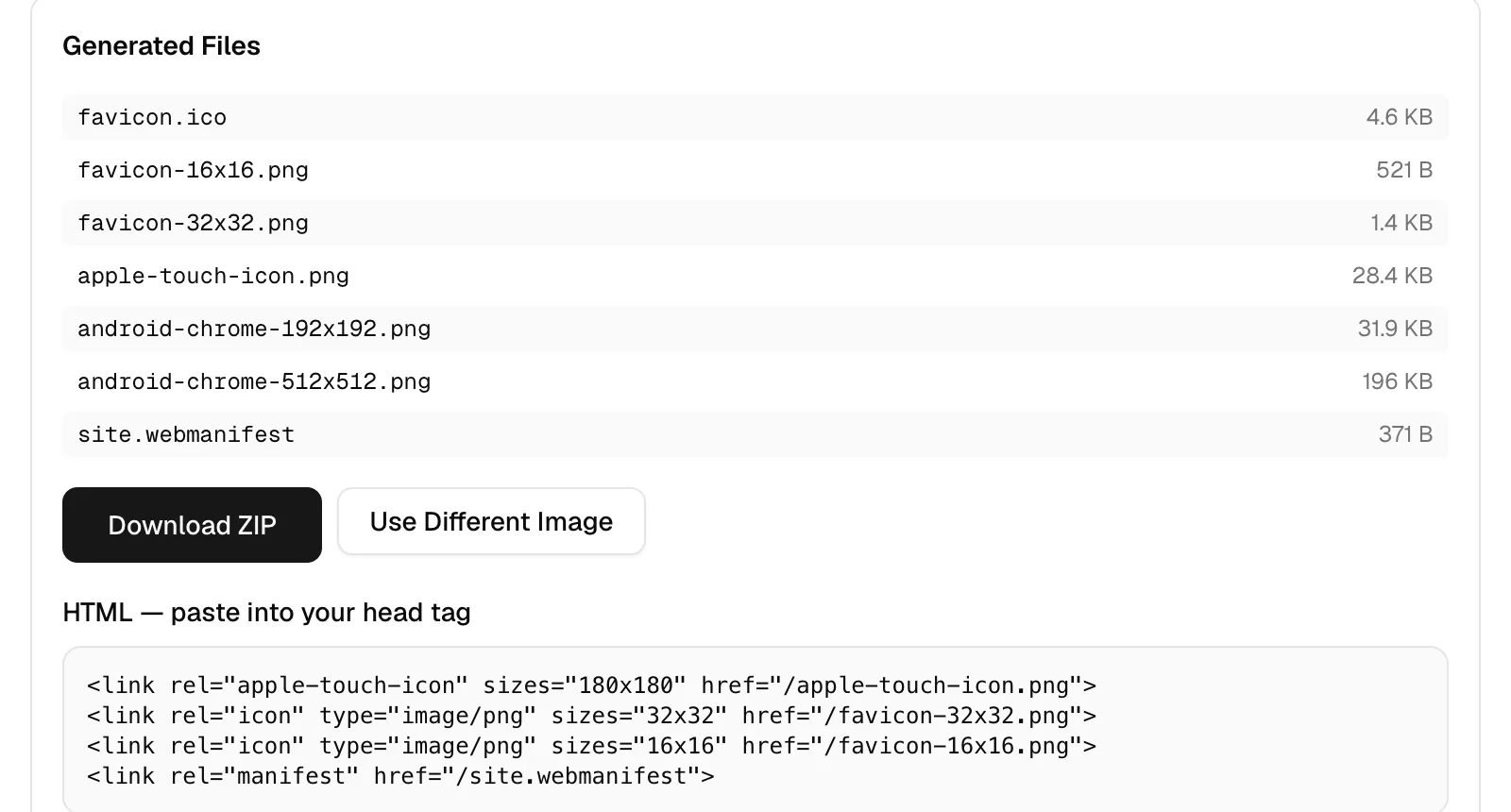
The icon generator takes SVG directly, which the compressor, resizer and cropper don't: those three accept JPEG, PNG, WebP, AVIF and GIF only. It renders your SVG onto a square canvas sized to the larger of its two dimensions or 512 pixels, whichever wins, so a 64x64 icon still gets a 512 canvas to downsample from. Out come seven files: favicon.ico packing 16, 32 and 48, favicon-16x16.png, favicon-32x32.png, a 180px apple-touch-icon.png, android-chrome-192x192.png, android-chrome-512x512.png and site.webmanifest. Why that one .ico still earns its 4.6 KB is a separate argument. One file at a time, 10 MB cap. The converter is the batch tool: 10 files and 50 MB per run.
Should I compress the PNG afterwards?
Usually, and the mode matters more than any slider. On a 942.4 KB transparent PNG at 900x606, the lossless path (oxipng level 3) came out at 383.9 KB. That is a 59% cut, and every pixel is bit-identical to the input. The palette path (imagequant) took that same file to 98.3 KB, a 90% cut, by reducing it to 256 colors. Flat vector art is the best case for the palette mode, since a logo with six fills has nothing like 256 colors to give up. Compressing also strips all metadata. Run both in the compressor and keep whichever holds up.
Do this next: open the SVG in a text editor, search for http to catch linked fonts and images, outline any live text, then set width and height on the root <svg> to half your target size and drop it on /convert/svg-to-png. If the PNG is headed for a web page, send it straight to the compressor, and the PNG against WebP numbers for a file with transparency tell you whether to change format at all. If it's headed into a document, our notes on JPG to PDF cover the page size a converted image ends up with.