How do I extract text from a PDF without uploading it?
A digital PDF gives up its text exactly and a scan has to be recognized. Which one you have, what six measured fixtures did, the 25-page cap and the download you pay for either way.
7 min read
On this page
Two files can both end in .pdf and need completely different work to get the words out. One was printed to PDF by a word processor and already holds the characters. The other is a photograph of paper in a PDF wrapper. Our PDF to text page opens the file in your browser tab, checks every page and picks what that page needs. Your document never leaves the disk.
Two engines share the tab. pdf.js, Mozilla's PDF reader, parses the document and hands over either the stored text or a rendered picture of the page. Tesseract compiled to WebAssembly recognizes a page when it turns out to be a picture. Both are served from this domain and cached after your first run.
Why is one PDF exact and another one recognized?
A PDF is a container, and the ISO 32000-1 specification gives it a place to store text operators along with their position on the page. Software that generates a PDF writes real characters in there, so getting them back out is a read. Nothing is guessed. That's the only place the word exact belongs.
A scan holds no characters at all. Something photographed each page and the picture got wrapped in a PDF, so those pages are rendered and pushed through OCR one at a time. They inherit that engine's accuracy and its failure modes, which we measured on screenshots in the image to text writeup. Same engine, same models.
How does it decide a page is a scan?
By counting, page by page. It reads the text layer first and counts the characters in it that aren't whitespace. More than 20 and the page is taken verbatim and labeled exact. Twenty or fewer and the page gets rendered and sent to OCR. A born-digital page clears that line by a wide margin: the dense fixture we test with carries 426 characters.
The line is there to catch the scan that still holds a stray text object, a page number or a header stamp, which would otherwise be handed back as the whole page. It's a threshold and not a test, so it has an edge. A scan carrying more than 20 characters of stray text clears the line, and you get the letterhead labeled exact while the body stays locked in the picture. The page summary is where that shows up: a document you know is scanned reporting pages read from the text layer is the case to look at.
At what resolution does a scanned page get read?
200 DPI. A PDF measures its pages in units of a 72nd of an inch, so rendering one at scale 1 puts body text around 10 pixels tall, under the roughly 20 pixels where recognition accuracy falls away. Rendering at 200 DPI puts that text near 28 pixels and makes a US Letter page 1700 by 2200, which is the scanning convention this tool follows.
There's a second ceiling behind it: 4096 pixels on the longest side, applied after the DPI scale. An ordinary page is nowhere near it. A page longer than about 20 inches is scaled back to fit and read at less than 200 DPI, in proportion to how far over it went. A plan set or a poster is what hits that, and nothing on the card warns you.
What did the measured runs show?
Six fixtures went through the engine on 2026-08-12, on desktop hardware. Similarity compares the output against the text we knew was in the document, character by character.
| Fixture | Pages read | Method | Similarity |
|---|---|---|---|
| Born-digital PDF | 1 of 1 | Text layer | 100.0% |
| Scanned page | 1 of 1 | OCR | 100.0% |
| Three-page digital PDF | 3 of 3 | Text layer | 100.0% |
| 28-page document | 25 of 28 | Text layer | not scored |
| Corrupt file | none | Rejected | not scored |
| Password protected file | none | Rejected | not scored |
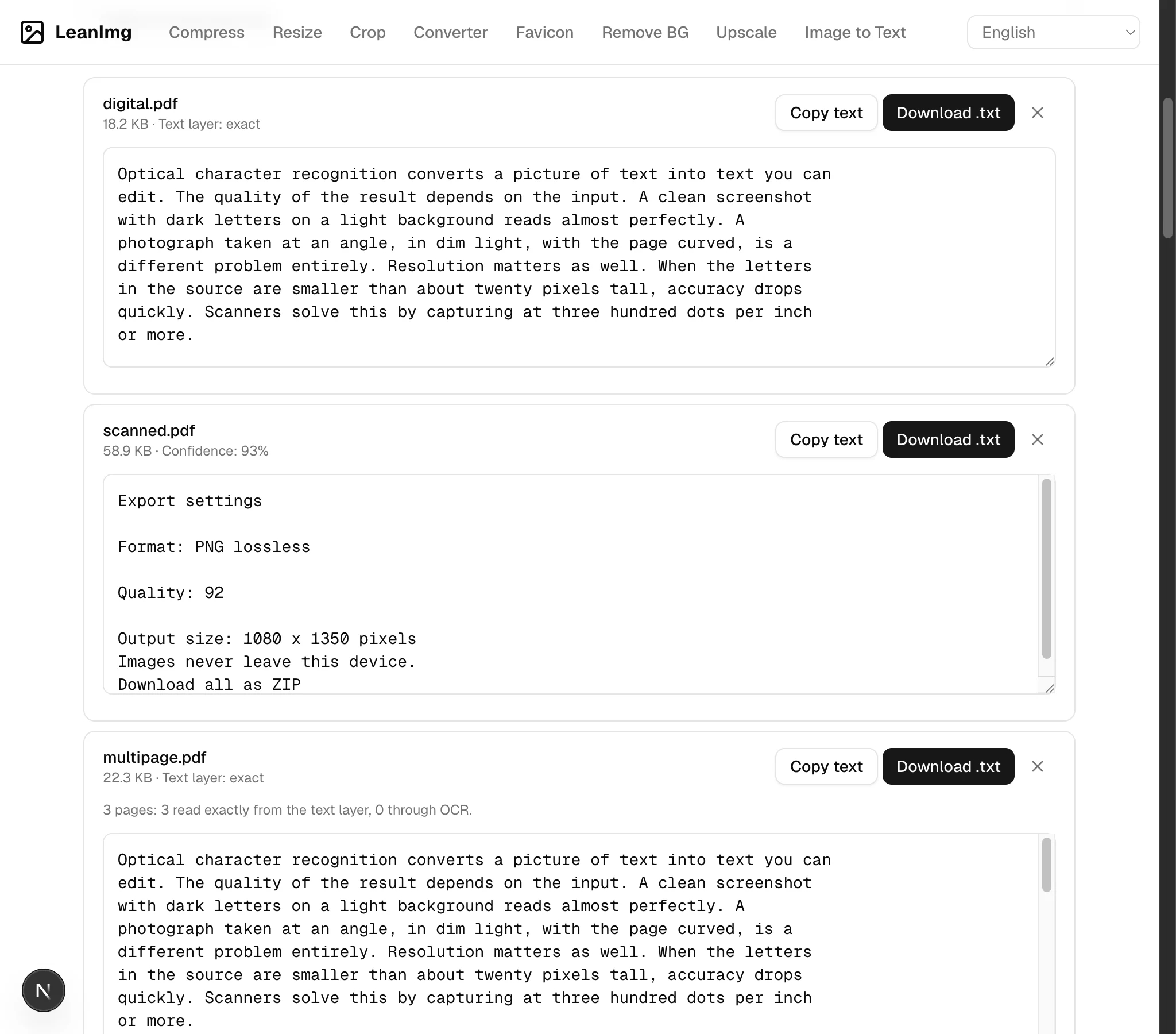
The scanned fixture came back at 100.0% too, and that row needs an asterisk. We built it by pushing an image through this site's own JPG to PDF converter, so it's crisp rendered type with no lens and no skew. Your bank's scanner is the harder case. A four-file batch with the 25-page document in it took 3.0 seconds of wall clock on a desktop.
What does the confidence score actually measure?
It measures the OCR pass, and only on pages where OCR ran. Text-layer pages enter the average at 100 by definition, so a file with one bad scan buried in a stack of digital pages still reports a comfortable number. On a mixed document that average tells you how much of the text is trustworthy. The page summary line is what answers the OCR question. "3 pages: 3 read exactly from the text layer, 0 through OCR" means nothing was recognized. A PDF read entirely from its text layer doesn't carry a score.
What happens at page 26?
One PDF gets 25 pages. The oversize fixture holds 28, and the run read the first 25 and printed a notice on the card saying so. Nothing fails quietly. For anything longer you'll want to split it in whatever PDF reader you have, then send the remainder as a second run.
Two kinds of file get refused outright. A corrupt PDF is rejected with pdf.js's own wording, "Invalid PDF structure.", which arrives in English on every locale because it comes from the reader rather than our translations. A password protected PDF is refused too, and this page won't ask you for the password. Strip the protection in the reader you already use, then run the copy.
Is it safe to run a bank statement through this?

That's the case the tool was built for. Payslips, contracts and scans of an ID are the documents people most want text out of, and they're the last ones you'd want sitting on a stranger's machine. There's no upload endpoint in this codebase that could receive one. Open the network tab during a run: engine chunks arrive from this domain and nothing carries your document away.
The big PDF services work the other way around. Your file reaches their machines first, and their answer to the privacy question is a retention promise: the copy gets deleted after some number of hours. We quoted that wording in the first article in this series. It tells you how long your payslip sits on someone else's disk. Whether it gets there is a separate question. Our privacy page lists what we collect.
When is this the wrong tool?
Handwriting, with a regular language selected. The Tesseract project says so plainly: you can point it at handwriting and it won't work very well, because the engine was built for printed characters. A scanned form with typed labels and handwritten answers hands you the labels and noise where the answers were. Choose English handwriting and those pages come back as a rough draft to proofread, after a first download of about 108 MB.
Layout is the other one. A text layer records where each run of characters sits and nothing about what any of it means, so a two-column page or a block of footnotes can come back in an order your eye would never take. Tables lose the grid and arrive as cell contents in sequence. Straight prose is nearly always fine. A rebuilt document with the original layout isn't something this page produces.
For the scanned half, the Tesseract quality notes match what our fixtures showed: bigger and sharper characters read better. If you're photographing paper rather than scanning it, the image extractor with a crop down to the text block beats wrapping that photo in a PDF first.
Why does a digital PDF still download an OCR engine?
Because that path hasn't been split yet. A PDF run pulls the pdf.js worker, 1,262,398 bytes in the 6.2.108 build we ship, plus the OCR engine and one language model at roughly 6 MB. That OCR half loads even when every page turns out to be born-digital and nothing needs recognizing, so on a file like that the download is wasted. It's a known limitation. The rest of the reader is lazier: character maps and image codecs arrive only when a document needs them.
What do I do with the text afterward?
You get plain text. Copy it with the button, or download a .txt with the pages separated and labeled. If your source is a screenshot, the image to text tool is the page for it, and the six screenshot fixtures we scored cover the 515 characters OCR invented from a photo with no writing in it. Going the other direction, the JPG to PDF converter builds a document out of images and the compressor gets them down first when they're heavy.
If you're turning that text into a book, an AI ebook creator exports an EPUB and a print PDF from the manuscript.
Try it on the worst PDF you have. Drop it on the PDF to text page, then read the page summary line before you read the text.