How do I remove an image background for free with no watermark?
What the IS-Net model does inside your browser tab, why the cutout is always a bigger PNG and how to get that PNG back down, with measured numbers.
Every free background remover makes the same two promises: no watermark and no sign-up. Almost all of them still want your file. It gets posted to a server, a model runs there and a retention policy promises deletion in an hour or a day. Ours doesn't work that way. The background remover loads the IS-Net model into your browser tab and runs it on your own machine, so the picture never becomes the body of an HTTP request.
What comes back is always a PNG with an alpha channel, and it's usually bigger than the file you dropped in. That catches people out. Transparency has a price and PNG is the only widely supported format that will carry it.
Does the image leave my computer?
No. There's no API route in this codebase and no server action, so there's no endpoint that could receive your image even by accident. The only network traffic the tool makes is a same-origin fetch for the model weights, which sit under /ml-assets on our own domain, and you'll only download those once. After that your browser has them cached. Your file is read with createImageBitmap, handed to the model as pixels and written back out as a Blob that lives in the tab until you download it or close it. There's nothing to queue for deletion later because nothing arrives anywhere. The privacy page is short for that reason.
What does the IS-Net model actually do?
IS-Net is a salient object segmentation network from the DIS research. It reads the whole frame and predicts, per pixel, how likely that pixel is to belong to the one thing the picture is about. That prediction becomes the alpha channel of the output PNG. It doesn't know what a person is, or a bottle of shampoo. It knows salience. That's why a single subject on a plain floor cuts out cleanly while a group of people on a busy street often doesn't.
The runtime is ONNX Runtime Web and the engine asks for the WebGPU device. Where WebGPU is missing the library falls back to CPU on its own and it'll still finish, slower. Files run one at a time. Drop ten and you'll wait through ten inference passes, so a batch of holiday photos is a coffee break.
Why is the cutout PNG bigger than the JPG I dropped in?
JPEG carries no alpha channel in any mode, so a cutout can't stay a JPEG. The output has to be PNG, which is lossless. Two things happen at once. The decoded pixels get stored exactly, compression artifacts and all, and every pixel gains an alpha byte it never had before. Lossless storage of photographic detail is expensive. For scale, texture.jpg in our test set is 3840x2160 and weighs 538.6 KB, while alpha.png is 900x606 with transparency and weighs 942.4 KB. That's about 1.75x the bytes at roughly a fifteenth of the pixel count. Nobody added anything to your image. You're just paying PNG prices now.
How do I make the cutout PNG smaller?
Send it to the image compressor and pick one of the two PNG modes. They'll both keep the alpha channel. "PNG no compression" runs oxipng at level 3, which is lossless: same pixels, fewer bytes. "PNG smaller file size" runs imagequant, which reduces the image to a palette. Here's what each one did to alpha.png, the 900x606 transparent PNG above.
| Mode | What it does | Result | Change |
|---|---|---|---|
| Source file | 900x606 PNG with a real alpha channel | 942.4 KB | baseline |
| PNG no compression | oxipng level 3, fully lossless | 383.9 KB | -59% |
| PNG smaller file size | imagequant, palette reduction | 98.3 KB | -90% |
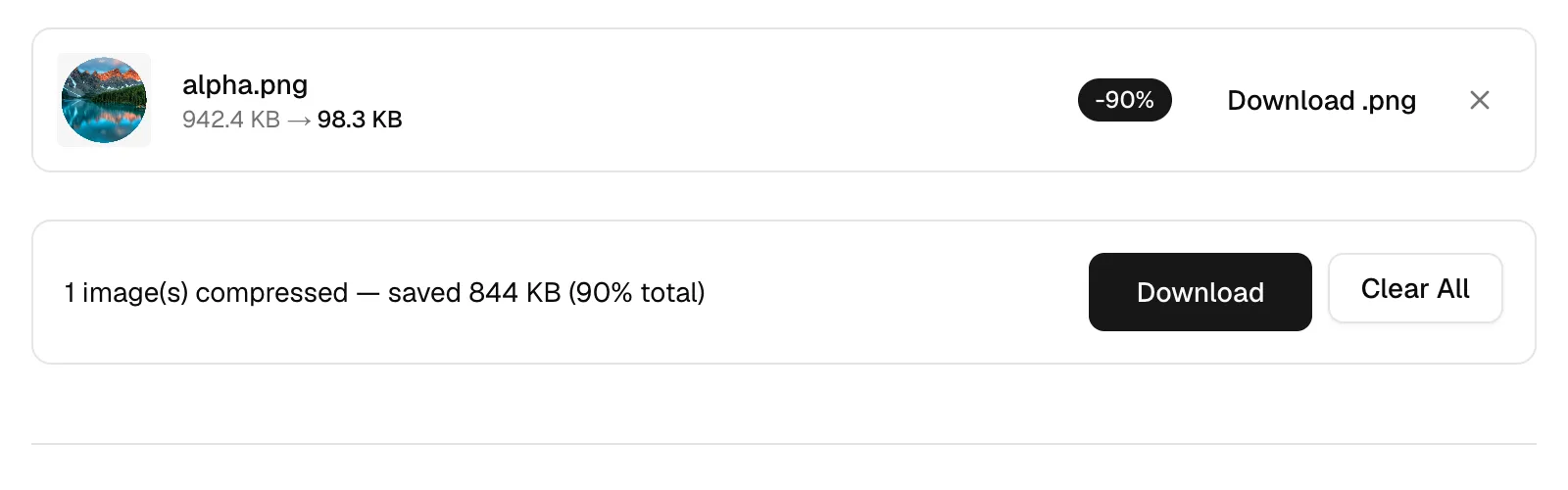
The palette route eats gradients first. Flat logos and packshots survive it well. A hair fringe over a soft shadow is where banding shows up, so look at the result at full size before you ship it. Compressing also strips every piece of metadata: EXIF, GPS, ICC profile and embedded thumbnail. Orientation survives.
Can it put a white background behind the subject?
It won't. The remover writes alpha and stops there. There's no fill color and no replacement image anywhere in the tool. If you want white behind the subject, run the finished PNG through PNG to JPG. Any target format without an alpha channel gets the transparency composited onto white, so JPEG and PDF both hand you a white background at no extra step. If you need the cutout at a different pixel size, the resizer writes PNG losslessly, so the alpha survives that trip too. The cropper does the same for PNG, one file at a time up to 10 MB.
Which files can I drop in, and how many?
Ten files and 50 MB per batch. The picker takes JPEG, PNG, WebP, AVIF, GIF, BMP and ICO. SVG and HEIC are refused before any model work starts, because Chrome can't decode either one: SVG is XML with no pixels, and HEIC is a HEIF container that only Safari renders. For an iPhone HEIC, run HEIC to PNG first and drop the result into the remover, and why Windows can't open that file either explains what's inside the container. Each output keeps the source file's base name with a .png extension, so you'll recognize them in your downloads folder, and several results at once come down as background-removed.zip.
Why did my cutout come back completely blank?
An image with no salient subject returns a fully transparent PNG, and the size drop can even read as a saving. We check for that, so you don't ship a blank by mistake. After each run the engine samples the alpha channel down to a 1024 px side and counts the pixels sitting at alpha 64 or above. If under 0.1% of the frame survives, the card tells you no subject was found. Landscapes, textures and flat backdrops land there routinely. The file is still yours to download. It just isn't a cutout, and no amount of re-running will make it one.
Try one file before you queue ten. Drop a single packshot on the background remover, download the PNG, then send that same PNG straight to the compressor and choose "PNG smaller file size". Compare the two sizes and decide which one you'd actually ship. If that cutout is also going into a document, the page a single image turns into once it's a PDF is measured separately.