Is KB or MB bigger? MB, and how to check your file
MB is bigger: one megabyte is 1,000 kilobytes. See where to read a photo's size, how to compare it with an upload limit and how to get under it.
8 мин чтения
На этой странице
A megabyte (MB) is bigger than a kilobyte (KB). One MB is 1,000 KB. From smallest to largest the units run byte, KB, MB, GB and TB, each 1,000 of the one before it. So a 2 MB photo is a bigger file than a 900 KB one, even though 2 is the smaller number.
Did a form or an app just tell you a file is too big? The rest of this page is the check: where your phone or computer shows a photo's size, what real upload limits look like and what to do when your file is over.
Which is bigger, KB or MB?
MB. To turn megabytes into kilobytes, multiply by 1,000, so a 3.2 MB photo is 3,200 KB. Against a 500 KB limit that's more than six times too big. Put two sizes in the same unit and the bigger number is the bigger file.
| Unit | Written | Bytes | Where you meet it |
|---|---|---|---|
| Byte | B | 1 | The unit every file size is counted in |
| Kilobyte | kB or KB | 1,000 | A US visa photo may be 240 kB at most |
| Megabyte | MB | 1,000,000 | Our iPhone 16 Pro test photo is 5.3 MB |
| Gigabyte | GB | 1,000,000,000 | Apple's Mail Drop sends attachments up to 5 GB |
| Terabyte | TB | 1,000,000,000,000 | Computer storage: Apple's packaging says 1TB = 1 trillion bytes |
You'll see the kilobyte written several ways. The State Department prints 240 kB on its visa page and 54 KB on its online passport renewal page, while gov.uk prints 50KB with no space. They're all kilobytes.
How many KB are in a MB?
1,000. Kilo means a thousand and mega a million in the metric prefixes: NIST puts one megabyte at 1,000,000 bytes.
| Limit | In KB | In MB |
|---|---|---|
| 100 KB | 100 | 0.1 |
| 200 KB | 200 | 0.2 |
| 500 KB | 500 | 0.5 |
| 1 MB | 1,000 | 1 |
| 2 MB | 2,000 | 2 |
| 5 MB | 5,000 | 5 |
| 10 MB | 10,000 | 10 |
| 20 MB | 20,000 | 20 |
| 25 MB | 25,000 | 25 |
One catch, covered near the end: some screens, Windows among them, count 1,024 to each step where the standard says 1,000. The same file then shows a figure a few percent smaller.
How many MB is a photo and how much do upload limits allow?
Our iPhone 16 Pro test photo, a JPEG of 5712 x 4284 pixels, is 5.3 MB. That's about 5,300 KB: 22 times the 240 kB a US visa photo may weigh. Camera files can run larger and swing with the quality setting: Nikon's Z fc manual lists a large JPEG at about 9.5 MB on its fine setting and about 2.4 MB on basic.
Limits come in every size. Here are some as each service prints them, then in KB.
| Where | Limit as printed | In KB |
|---|---|---|
| US visa photo | 240 kB or less | 240 |
| UK passport photo | At least 50KB and no more than 10MB | 50 to 10,000 |
| India JEE (Main) 2027 photo | 10 kB to 200 kB | 10 to 200 |
| Image in a post on X | 5 MB | 5,000 |
| LinkedIn profile photo | 8MB | 8,000 |
| Shopify product image | Smaller than 20 MB | Under 20,000 |
| Discord without Nitro | 20MB | 20,000 |
| Gmail attachments, personal account | 25 MB | 25,000 |
Email limits work differently enough to have their own guide.
How do I check the file size of a photo?
Open the photo's details. On an iPhone that's a swipe up in Photos. On a Mac it's Get Info and on a Windows PC it's Properties.
| Device | Where to look |
|---|---|
| iPhone | In Photos, open the picture and swipe up or tap the Info button. Apple's guide lists file size among the details. |
| Mac | In Finder, select the file, then choose File > Get Info or press Command-I. |
| Android | In Google Photos, open the picture and swipe up to Details. The size shown there is for the backed-up copy. |
| Samsung phone | In Gallery, tap More options (the three dots), then Details. Samsung says the image details show the file's size. |
| Windows PC | In File Explorer, choose View, then Details, for a Size column. Alt+Enter opens Properties for the selected file. |
A tip of our own for Windows: Properties shows two numbers, Size and Size on disk. Compare Size with the limit.
Then put your number and the limit in the same unit. If the file is over the limit or less than about 5% under it, make it smaller. Where the 5% comes from is near the end.
What can I do if my photo is too large to upload?
Make the file smaller, by cutting pixels or by compressing harder. Two of the services say to compress. The State Department's visa photo page says the image "may need to be compressed." LinkedIn's help suggests compressing the photo on your system.
Both levers moved our test photo a long way. Compressed at the default setting of our compressor with every pixel kept, the photo it shows as 5 MB came out at 1.6 MB. Resized to half its width and height in our image resizer, it came out at 1.1 MB.
Getting under an exact number
If the photo's name ends in .heic, an iPhone format our compressor can't open, convert it to JPG first. Then open our image compressor, add the photo and choose Target size. Type the limit in KB: 500 for a 500 KB limit, 2000 for 2 MB. Press Compress and download the result. The photo is processed in your browser and isn't uploaded.
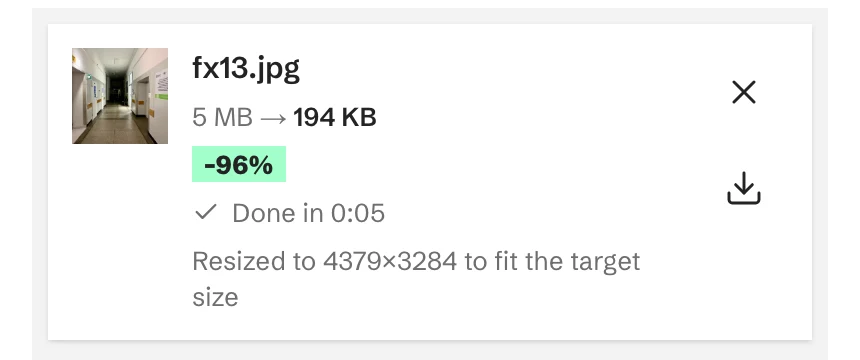
The result lands a little under the number you typed. The compressor counts a KB as 1,000 bytes, the stricter way, so the file is at or under the limit however the form counts. It lowers quality first and shrinks the pixel size only when the lowest quality still isn't enough. If it can't get there at all, the row says so.
| Typed | Our compressor shows | Pixels |
|---|---|---|
| 1000 | 973.4 KB | All 5712 x 4284 kept |
| 200 | 194 KB | Resized to 4379 x 3284 |
| 100 | 95.5 KB | Resized to 3096 x 2322 |
For a limit of 200 KB or less, make the photo smaller in pixels yourself first, then set the target. At 200, even the lowest quality setting was too big at full size, so the compressor cut pixels. When we resized the photo to 1920 pixels wide first and then set 200, it needed no further resizing. Shown at the same width, that file was the closer match to the original by a small margin. Our guide to getting a JPG under 100 KB has the longer walkthrough.
Target size turns a PNG or GIF into a JPG on a white background. Cropping isn't a reliable way down, because a crop can come back bigger.

Is 1 MB 1,000 KB or 1,024 KB?
1,000 by the standard. Some screens count 1,024 and still call it a KB or an MB, which is why one file can show two sizes.
The 1,024 is an old computing habit. The IEC, which sets the standard, says a kilobyte should be 1000 bytes and puts the gap at 2.4%. Since December 1998 the 1,024 multiple has had a prefix of its own, kibi (Ki), as NIST records, which makes 1,024 bytes a kibibyte (KiB). Windows Explorer went on calling 1,024 bytes a KB anyway, as a post on Microsoft's developer blog said in 2009. We weighed our test photo both ways.
| Counted by | Bytes to the kilobyte | Our 5.3 MB photo shows as |
|---|---|---|
| A Mac | 1,000 | 5.3 MB |
| Android 8.0 and later | 1,000 | 5.27 MB |
| Windows Explorer | 1,024 | About 5 MB |
| LeanImg's tools | 1,024 | 5 MB |
Nothing happened to the photo. Each screen divides the same bytes by its own number. Our tools count the Windows way, which is why our compressor shows this photo as 5 MB.
This only matters when a file is close to a limit. The two counts differ by 2.4% for a figure in KB and 4.9% for one in MB, so aim 5% under and you're safe either way: 475 KB for a 500 KB limit, 950 KB for 1 MB, 1.9 MB for 2 MB. A Mac already counts the stricter way, so on a Mac under is under.
One example from our tests: a photo our compressor shows as 538.6 KB shows as 551 KB on a Mac, so it would fail a 540 KB limit counted in 1,000s. None of the limit pages we quote says which way it counts.
Questions people ask
Is MB or KB a large file?
MB is larger. Whether a file counts as large depends on where it's going: 240 kB is the whole allowance for a US visa photo, while a personal Gmail message can carry 25 MB.
Which is bigger, MB or GB?
GB. One gigabyte is 1,000 MB, which is 1,000,000 KB.
Is 2 MB big for a photo?
Depends where it's going. It's less than half the size of our 5.3 MB iPhone photo and well inside LinkedIn's 8MB. Against a 240 kB visa limit it's more than eight times too big.
How many KB is a good quality photo?
No fixed number. Our 5712 x 4284 test photo kept every pixel at about 1 MB and had to lose pixels to reach 200 KB. How large a photo can print comes from its pixels, which our guide to image resolution covers.
Is MB the same as Mbps?
No. The MB on a file are megabytes. Data on the move is measured in bits per second, as the IEC describes it. A byte is eight bits, so one megabyte is eight megabits.